Network Configuration
Network Configuration
This guide outlines how the network topology is structured within the ProxLink homelab infrastructure, which is powered by Proxmox VE, pfSense, and Tailscale.
Overview
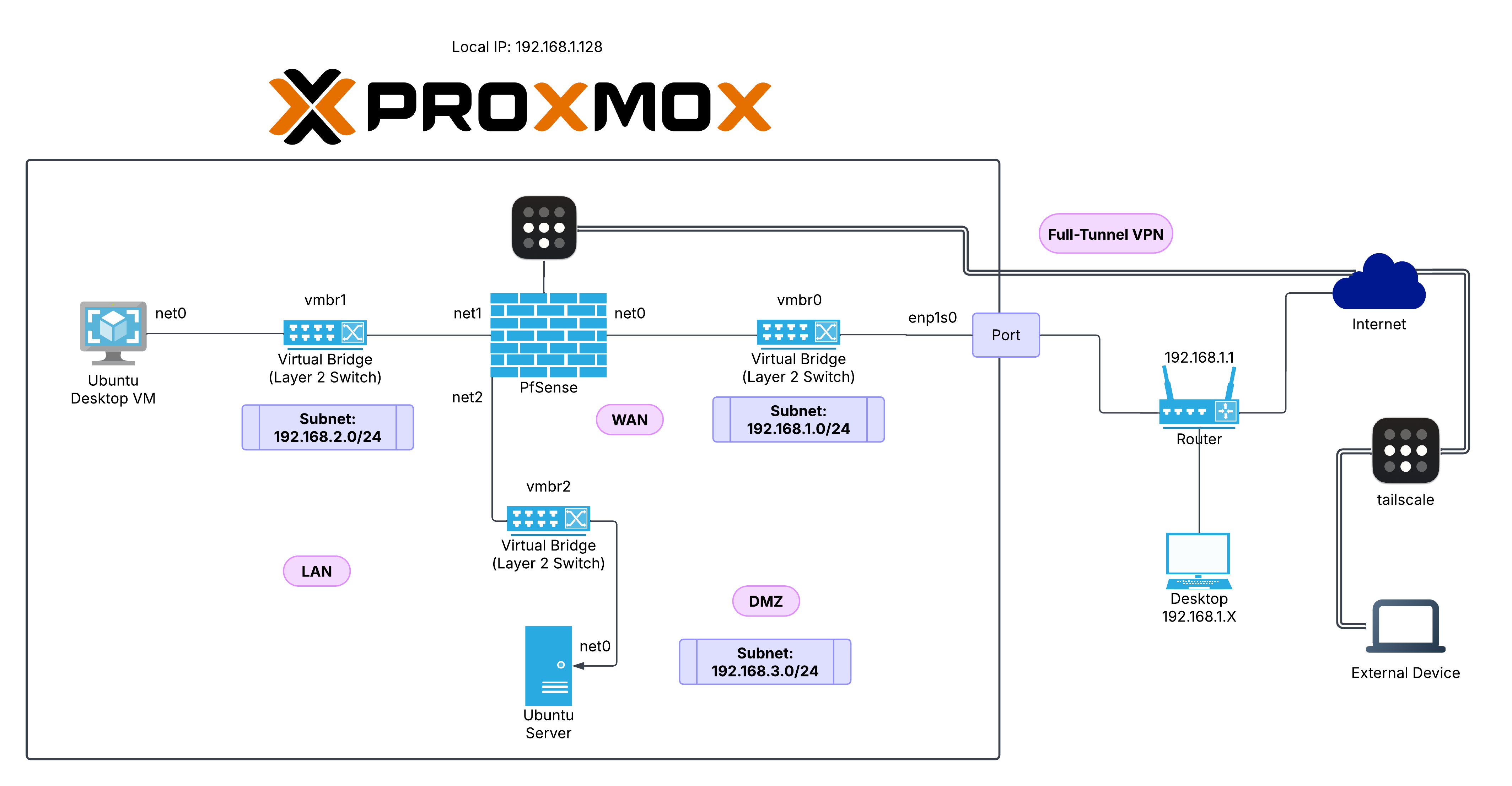
ProxLink uses a virtualized network architecture segmented into three main subnets:
- WAN: 192.168.1.0/24
- LAN: 192.168.2.0/24
- DMZ: 192.168.3.0/24
A pfSense virtual firewall routes and filters traffic between these networks, enabling secure connectivity, isolation, and full-tunnel VPN access.
Topology Components
Proxmox VE Host
- Acts as the virtualization platform.
- Provides virtual bridges (
vmbr0,vmbr1,vmbr2) to connect VMs to pfSense and the physical network.
Virtual Bridges (vmbr)
- vmbr0 – WAN bridge connected to the router (
192.168.1.0/24) - vmbr1 – LAN bridge for internal VMs (
192.168.2.0/24) - vmbr2 – DMZ bridge for exposed services (
192.168.3.0/24)
pfSense Firewall (VM)
- Interfaces:
- net0 (WAN): Connected to
vmbr0 - net1 (LAN): Connected to
vmbr1 - net2 (DMZ): Connected to
vmbr2
- net0 (WAN): Connected to
- Handles inter-VLAN routing, NAT, firewall rules, and VPN access.
Internal VMs
- Ubuntu Desktop VM
- Connected to LAN via
vmbr1
- Connected to LAN via
- Ubuntu Server
- Connected to DMZ via
vmbr2
- Connected to DMZ via
External Network
Router
- Default Gateway:
192.168.1.1 - Provides internet access for the Proxmox host and pfSense WAN interface.
External Access
- Devices on the
192.168.1.0/24subnet can access the pfSense WAN. - Tailscale provides full-tunnel VPN access, enabling remote access to internal services securely over the internet.
VPN Integration (Tailscale)
- Full-tunnel VPN routes traffic from external devices through pfSense.
- Ensures encrypted remote access to LAN and DMZ resources.
Subnet Breakdown
| Network | Subnet | Purpose | Bridge | Devices |
|---|---|---|---|---|
| WAN | 192.168.1.0/24 | External access to Internet | vmbr0 | pfSense (WAN), Router, Proxmox |
| LAN | 192.168.2.0/24 | Internal/Trusted VM network | vmbr1 | Ubuntu Desktop VM |
| DMZ | 192.168.3.0/24 | Semi-trusted services | vmbr2 | Ubuntu Server |